 AI Chat Tools
Guides · Updated November 21, 2026
How to Organise ChatGPT Chats Into Folders
Create folders in the ChatGPT sidebar, drag chats into them, nest subfolders, and hide filed chats so your list stays clean.
Create a folder
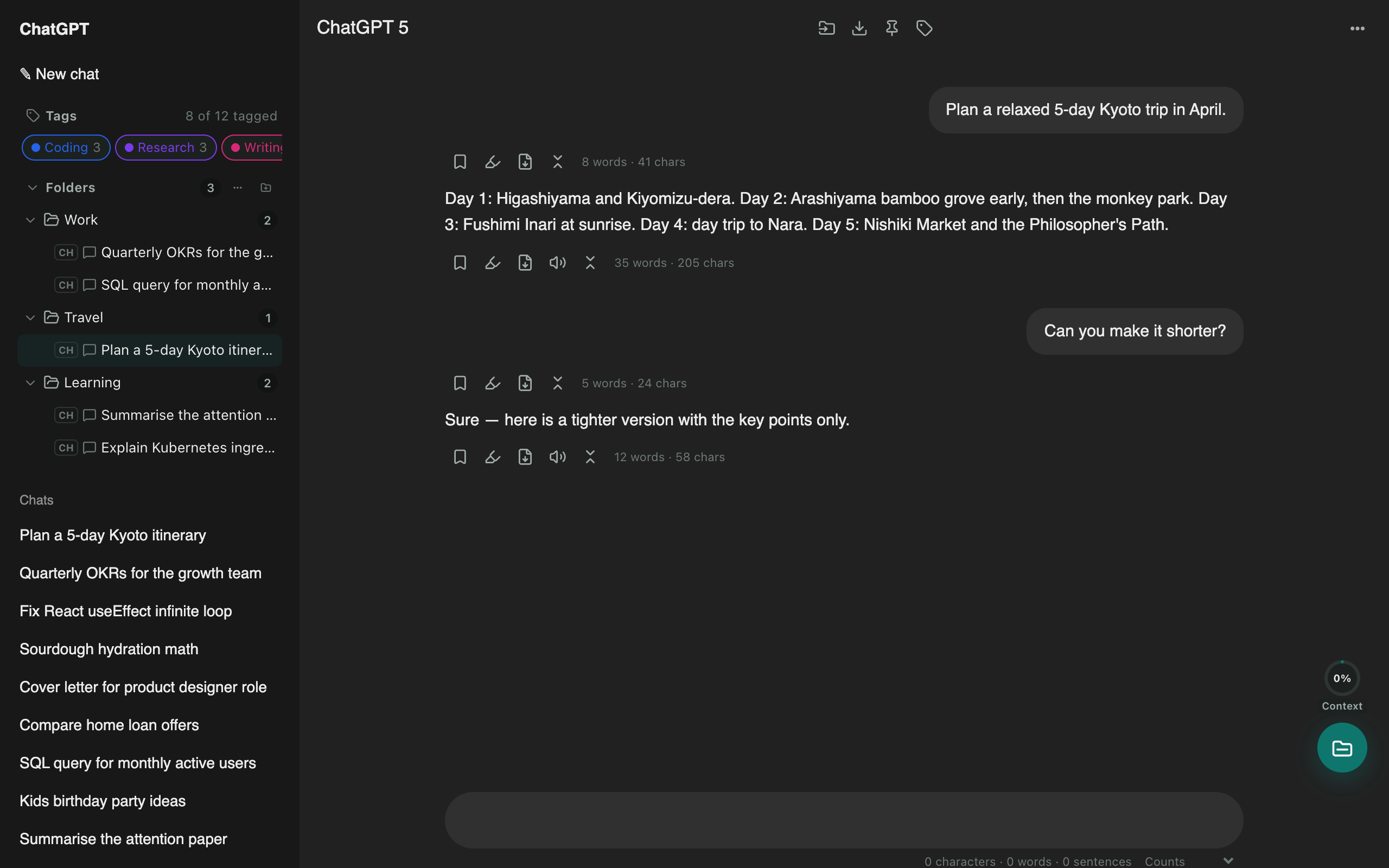
- Install AI Chat Tools and open chatgpt.com. A Folders section appears in the sidebar.
- Click the new folder icon, type a name and press Enter.
File chats
- Drag a chat from ChatGPT’s list onto a folder.
- Or open the chat and click the folder icon in the top bar.
- Hold Alt while dropping to move instead of add.
Keep the list clean
Turn on Hide filed chats from the site’s list in Settings, and ChatGPT’s list only shows what’s left to organise.
Go further
Nest subfolders, colour and star folders, pin your top chats, and add tags. Your folders also appear on Claude, Gemini and Grok.
Questions
Aren't ChatGPT Projects the same thing?
Projects are great for shared files and instructions. Folders are lighter: nest them, put one chat in several, mix chats from Claude and Gemini, and file existing chats without moving them.
Do this in one click with AI Chat Tools
Free Chrome extension for ChatGPT, Claude, Gemini and Grok. Your chats stay on your device.
Coming soon to the Chrome Web Store