 AI Chat Tools
Guides · Updated November 21, 2026
How to Search ChatGPT History (Including by Date)
Search the full text of your ChatGPT chats, filter by date range, questions or answers, and jump to the exact message. Works for Claude, Gemini and Grok too.
Search every message
- Install AI Chat Tools and open chatgpt.com. Your chats are indexed in the background; this takes a minute the first time.
- Press Ctrl/⌘ + Shift + F.
- Type what you remember. Matches are highlighted.
- Click a result to open the chat and jump to that message.
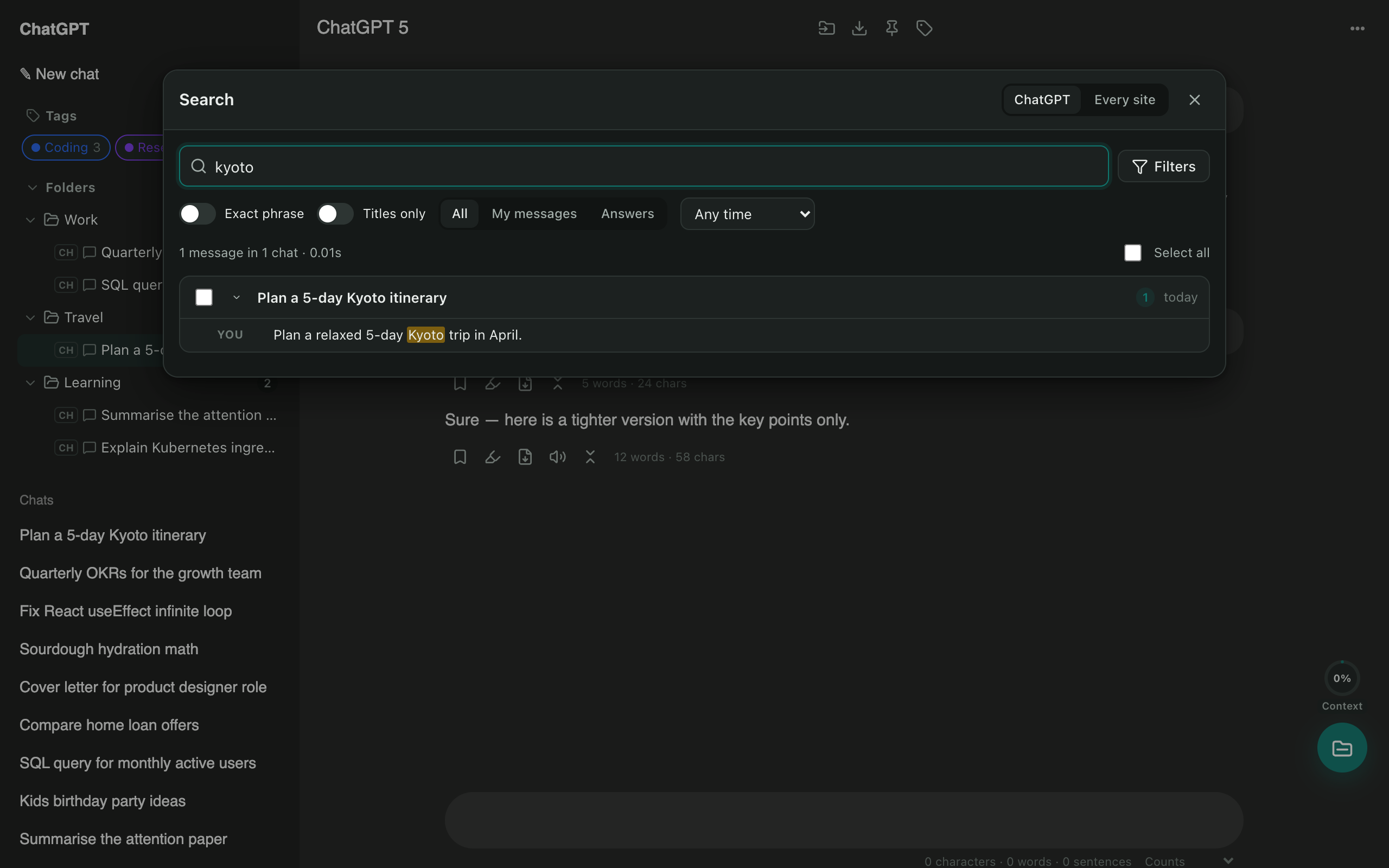
Search by date
Open the filters and pick Past week, Past month, Past year, or a Custom range with from and to dates.
Narrow it down
- Questions or Answers only.
- Exact phrase for word-for-word matches.
- Titles only for a quick scan.
Search all your AI chats at once
Click the AI Chat Tools toolbar button and choose Search all to search ChatGPT, Claude, Gemini and Grok together.
Questions
Why doesn't ChatGPT's own search find my chat?
It mostly matches titles and recent chats. AI Chat Tools indexes every message on your device.
Do this in one click with AI Chat Tools
Free Chrome extension for ChatGPT, Claude, Gemini and Grok. Your chats stay on your device.
Coming soon to the Chrome Web Store